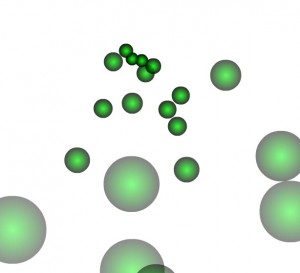
为了实现粒子在视觉上消失的效果,通过设置Particle的fade属性为0~1之间的小数,使它的alpha逐渐降低,从而达到淡出粒子的目的。
2 | import flash.display.Sprite; |
3 | import flash.events.Event; |
5 | [SWF(width="800",height="600",backgroundColor="0xffffff",frameRate="31")] |
6 | public class ParticleFade extends Sprite{ |
7 | private var numbers:Number = 20; |
8 | private var particles:Array; |
10 | public function ParticleFade(){ |
11 | particles=new Array(); |
12 | stage.addEventListener(Event.ENTER_FRAME, onEnterFrame); |
15 | private function onEnterFrame(e:Event):void{ |
16 | if(particles.length < numbers){ |
17 | var ball:Ball=new Ball(12, 0x00ff00, 1, 0x000000, 1); |
19 | ball.xVelocity=Math.random() * 20 - 10; |
20 | ball.yVelocity=Math.random() * 20 - 10; |
25 | ball.x=stage.stageWidth/2; |
26 | ball.y=stage.stageHeight/4; |
29 | for (var i:int=0; i < particles.length; i++){ |
30 | var particle:Ball=particles[i]; |
32 | if (particle.x - particle.radius > stage.stageWidth || particle.x + particle.radius < 0 || particle.y - particle.radius > stage.stageHeight || particle.y + particle.radius < 0){ |
33 | particle.xVelocity=Math.random() * 20 - 10; |
34 | particle.yVelocity=Math.random() * 20 - 10; |
35 | particle.x=stage.stageWidth / 2; |
36 | particle.y=stage.stageHeight / 4; |
37 | particle.scaleX = particle.scaleY = 1; |
在初始化粒子的循环中将粒子的fade属性设置为0.98,在遍历粒子数组并使其运动的循环中调用update函数使粒子运动并改变它的alpha属性。超过环境边界后,再重置它的速度和位置,并将它的alpha设置回1,从而在下一次的遍历循环中演示它的fade属性。
转载请注明:陈童的博客 » 淡出粒子